
New Ai features added, explains and fix console errors, project back up and auto complete using Ai.
AppMarket24.com
Quality apps built with AppCreator24.
Screenshots
Preview of the app
About this app
HTML Editor – Code, Preview & Manage Projects
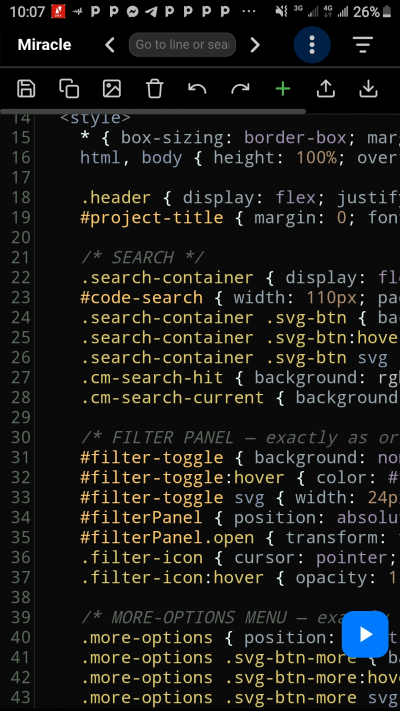
Unleash your creativity with the all-in-one HTML Editor, the ultimate tool for writing, editing, and previewing web code directly on your Android device. Whether you're a seasoned developer or just starting your coding journey, this powerful app gives you everything you need to build and test HTML, CSS, and JavaScript projects – anywhere, anytime.
Write code with confidence using the built-in syntax highlighting editor, preview your creations instantly, and manage multiple projects seamlessly. No ads, no distractions – just pure coding.
Why you'll love HTML Editor:
📝 Powerful Code Editor
Enjoy a full-featured text editor with syntax colouring for HTML, CSS, and JavaScript. Line numbers, search and replace, undo/redo, and a clean, eye-friendly dark theme keep your focus on the code. Easily adjust the font size with a simple slider to match your comfort.
🔍 Smart Search & Go to Line
Quickly find text with highlighted search results, or jump directly to a specific line. Navigate through your code faster than ever.
🎨 Live Preview
See your code in action instantly. Hit the preview button to load your HTML into a full-screen browser view. Minimise, reposition or close the preview as you like – perfect for rapid prototyping.
📂 Project Management
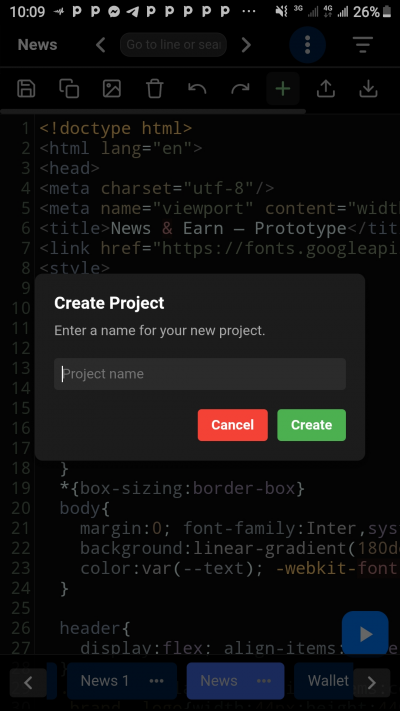
Organise your work into separate projects. Create, rename, delete, and switch between projects with a tap. Each project stores its own code, so you can work on multiple sites without messing up your files. The project bar at the bottom gives you fast access to all your creations.
🧩 Snippets & Quick Inserts
Speed up your coding with a handy library of pre-built HTML tags, CSS properties, and JavaScript functions. Just pick a snippet and it's dropped right into your code.
🖼️ Image URL Helper
Uploaded images earlier? Access their URLs directly from the app and copy them to your clipboard with one tap – ideal for quickly embedding images in your HTML.
🔄 Import & Export
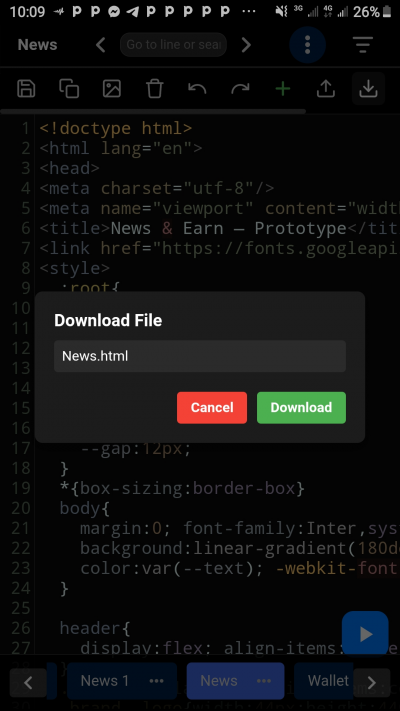
Import existing .html, .css or .js files from your device storage, or download your project as a complete HTML file. Perfect for bringing in external code or saving your work to share with others.
🎛️ Filter Views
Focus on a specific language by temporarily filtering your code. View only HTML, CSS, or JavaScript in the editor while the full source remains safely stored. Toggle the filter off to get back the complete file.
🎯 Data Safety & Offline First
All your projects are saved locally on your device. No internet connection is required – code anytime, even offline. Your data stays private and under your control.
🖋️ Customisation & Comfort
Toggle line numbers on/off, switch between light and dark background, and scale the editor’s font size exactly how you like it.
📤 Upload & Contact
Need support or want to suggest a feature? Reach us directly from the app. You can also upload images for use in your projects.
No sign-up. No subscription. Just a robust, user-friendly HTML editor that respects your privacy and helps you build web pages on the go.
Download HTML Editor now and start turning your ideas into real web pages – right from your phone.
Unleash your creativity with the all-in-one HTML Editor, the ultimate tool for writing, editing, and previewing web code directly on your Android device. Whether you're a seasoned developer or just starting your coding journey, this powerful app gives you everything you need to build and test HTML, CSS, and JavaScript projects – anywhere, anytime.
Write code with confidence using the built-in syntax highlighting editor, preview your creations instantly, and manage multiple projects seamlessly. No ads, no distractions – just pure coding.
Why you'll love HTML Editor:
📝 Powerful Code Editor
Enjoy a full-featured text editor with syntax colouring for HTML, CSS, and JavaScript. Line numbers, search and replace, undo/redo, and a clean, eye-friendly dark theme keep your focus on the code. Easily adjust the font size with a simple slider to match your comfort.
🔍 Smart Search & Go to Line
Quickly find text with highlighted search results, or jump directly to a specific line. Navigate through your code faster than ever.
🎨 Live Preview
See your code in action instantly. Hit the preview button to load your HTML into a full-screen browser view. Minimise, reposition or close the preview as you like – perfect for rapid prototyping.
📂 Project Management
Organise your work into separate projects. Create, rename, delete, and switch between projects with a tap. Each project stores its own code, so you can work on multiple sites without messing up your files. The project bar at the bottom gives you fast access to all your creations.
🧩 Snippets & Quick Inserts
Speed up your coding with a handy library of pre-built HTML tags, CSS properties, and JavaScript functions. Just pick a snippet and it's dropped right into your code.
🖼️ Image URL Helper
Uploaded images earlier? Access their URLs directly from the app and copy them to your clipboard with one tap – ideal for quickly embedding images in your HTML.
🔄 Import & Export
Import existing .html, .css or .js files from your device storage, or download your project as a complete HTML file. Perfect for bringing in external code or saving your work to share with others.
🎛️ Filter Views
Focus on a specific language by temporarily filtering your code. View only HTML, CSS, or JavaScript in the editor while the full source remains safely stored. Toggle the filter off to get back the complete file.
🎯 Data Safety & Offline First
All your projects are saved locally on your device. No internet connection is required – code anytime, even offline. Your data stays private and under your control.
🖋️ Customisation & Comfort
Toggle line numbers on/off, switch between light and dark background, and scale the editor’s font size exactly how you like it.
📤 Upload & Contact
Need support or want to suggest a feature? Reach us directly from the app. You can also upload images for use in your projects.
No sign-up. No subscription. Just a robust, user-friendly HTML editor that respects your privacy and helps you build web pages on the go.
Download HTML Editor now and start turning your ideas into real web pages – right from your phone.
More tools in English.
Related apps
More apps in the same category